

DataTable
DataTable renders tabular data a reviewer needs to work with rather than read through: it sorts by any column, narrows to matching rows, hides columns that are not part of the current question, bands rows under a grouping column, and lets the reader choose how cells meet the available width - so a reference grid stays useful instead of becoming a wall the reviewer scrolls past.
How it looks
Section titled “How it looks”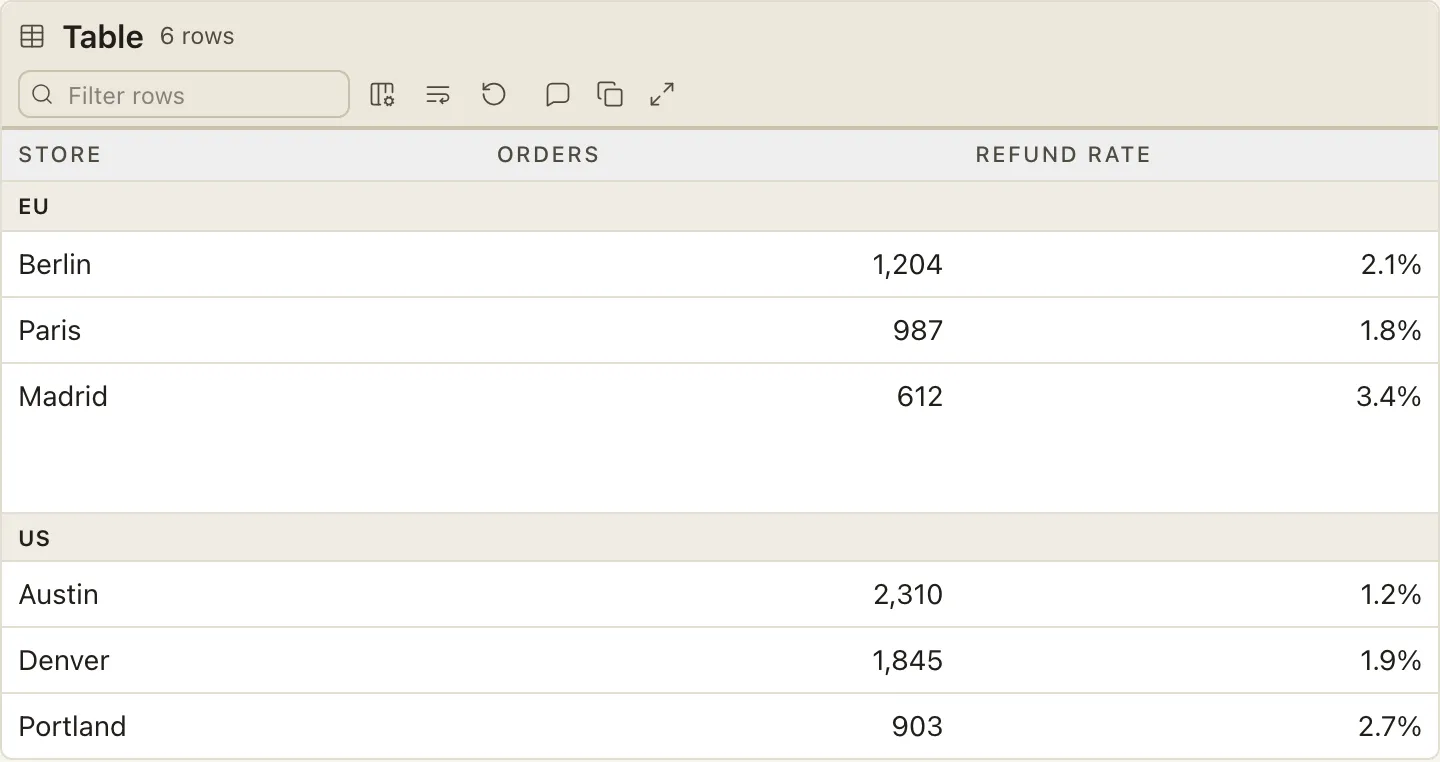
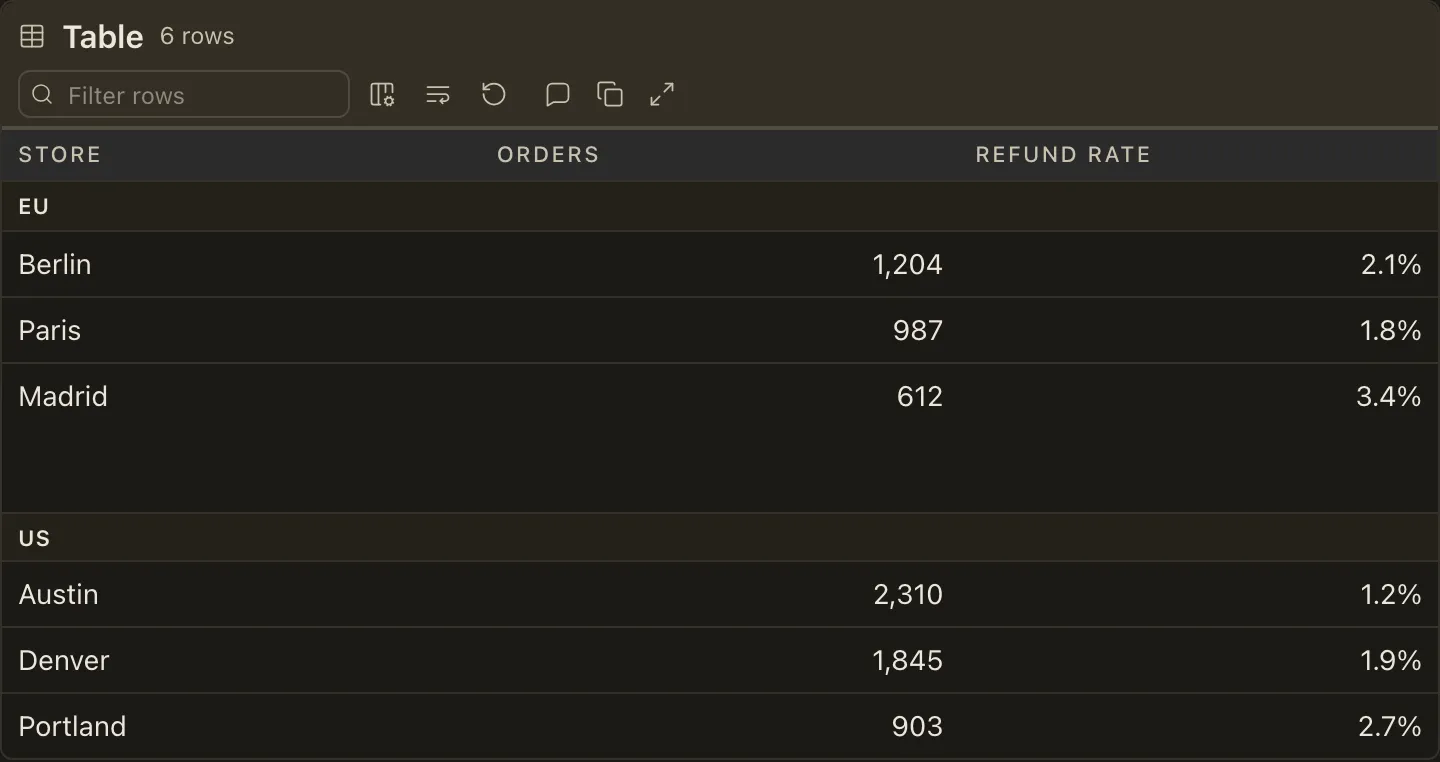
The figure opens with a header band carrying the table name, a live row count, and the reader’s controls: an optional search box, the columns menu, a text-fit menu, reset, and maximize. Below it sits the complete grid, every authored row and column present in the served markup.
Each column header has a separate sort control. Activating it cycles ascending, descending, and back to the order the author wrote, because authored order is information and a table that cannot return to it loses that on the first click. The separate control leaves links and other authored markup in a Markdown table’s header independently usable.
A table sizes to its contents. Three narrow columns stay narrow; nothing stretches to fill the reading column.
When to use it
Section titled “When to use it”Use DataTable when the grid is a dataset the reviewer will query rather than a paragraph laid out in columns:
- it runs past roughly ten rows, or carries more than four columns
- the reviewer’s likely question is “which row” rather than “what does this say”
- it is a reference they will return to after the plan is approved
- the author needs typed columns, grouping, a summary row, or an explicit opening sort
When not to use it
Section titled “When not to use it”- A short comparison read top to bottom once, where every row matters to the argument - use a plain markdown table; most tables in most plans are this
- A database table’s shape - use
DatabaseTableSchema, which understands keys, indexes, and DDL - Options scored against shared criteria - use
DecisionAnalysis, which is a decision surface rather than a dataset - Anything needing a sentence of explanation per cell - that belongs in the prose around the table
Compared with
Section titled “Compared with”- A plain Markdown table — reach for it by default. Big Plan adds sorting, filtering, column visibility and order, text fit, reset, and maximize without changing the authored Markdown. Use
DataTablewhen the author also needs a title, an explicit opening sort, typed columns, grouping, or a summary row.
Authoring
Section titled “Authoring”The body is one fenced block with language table holding an ordinary GFM pipe grid, so a markdown table that outgrew itself is wrapped rather than rewritten. The delimiter row’s colons still set alignment.
<DataTable title="Queue depth by processor" filter groupBy="Tier">
<Column name="Attempts" type="number" align="right" sort="desc" /><Column name="Processor" fit="truncate" />
...one fenced `table` block here...
<SummaryRow>
```table| Total | 222 |  |  |```
</SummaryRow>
</DataTable>
With no Column children every column is text and sortable, takes its alignment from the delimiter row, inherits the table’s fit, and is shown in authored order.
Attributes
Section titled “Attributes”| Attribute | Values | What it does |
|---|---|---|
title |
text | Names the table in its header and derives its persistence identity. |
filter |
bare boolean | Renders the search box. Add it only when the table is long enough that a reviewer will hunt a row. |
fit |
wrap, truncate, scroll |
How cells meet the available width. Defaults to wrap. |
groupBy |
a column name | Bands rows under that column’s values. |
Column
Section titled “Column”Column refines one header by name; declare it only to override a default.
| Attribute | Values | What it does |
|---|---|---|
name |
a header in the grid | Which column this refines. Required. |
type |
text, number, date |
Picks the comparator. Empty and unreadable cells always sort last. |
align |
left, center, right |
Cell alignment, overriding the delimiter row. |
sort |
asc, desc |
The table’s opening order. At most one column may declare it. |
fit |
wrap, truncate, scroll |
Overrides the table’s fit for this column alone. |
SummaryRow
Section titled “SummaryRow”When one row describes the complete dataset rather than one record, use SummaryRow.
Common summaries include totals, averages, ranges, and overall budgets.
If a reader should sort, filter, or group the row like a record, keep it in the main grid.
SummaryRow takes no attributes.
Give it one fenced table block that contains one pipe row.
Write one cell for every table column, in the same order as the headers.
<SummaryRow>
```table| Total | 222 requests |  | Across all processors |```
</SummaryRow>
A table accepts one summary row. To report several aggregates, place them in the relevant cells of that row. The summary row stays at the bottom and never participates in sorting, filtering, grouping, or the row count. Its cells follow the visible column order when a reader hides or reorders columns. Its values summarize the complete authored dataset and do not recalculate when a reader filters the table. When the reader copies the table as tab-separated text, the summary follows the visible data rows. A summary row is also valid when the table does not declare an opening sort.
Text fit
Section titled “Text fit”Too much content for the available width has exactly three answers, and DataTable makes the choice explicit instead of always picking the same one:
- Wrap (the default) keeps every character and spends vertical space.
- Truncate clamps each cell to one line. Reach for it when cells are long identifiers - paths, URLs, ids - that wrap into unreadable stacks.
- Scroll keeps one line and moves sideways. Reach for it only when horizontal adjacency is itself the information.
Wrapping is the default because content that has scrolled off-axis does not announce that it exists: the reviewer cannot tell they are not reading it. Below the narrow breakpoint the table wraps whatever anyone chose, because a horizontal scrollbar nested inside a vertically scrolling phone document is a trap.
Sorting and filtering always read a cell’s complete text, never the clamped text, so a truncated cell still sorts correctly and still matches a search for a word the reader cannot currently see.
Grouping
Section titled “Grouping”groupBy names a column whose values become subheading bands. The column stays a real column - listed in the columns menu, sortable, revealable - and only hides while it supplies the bands, because grouping is a setting over the data rather than a different shape of data.
You choose the default; the reader can regroup by any column or turn grouping off entirely. Generous whitespace before each later band keeps the groups unmistakably separate without making the tinted band itself heavy. Sorting then reorders rows within a group and never across one: the groups are the structure you chose, and a sort is the reader’s question about the rows inside it. Filtering removes empty bands and preserves that separation between the groups that remain.
Use one level. A second level is an outline, and an outline is a different component.
What the reader controls
Section titled “What the reader controls”Everything below is the reader’s, not the author’s, and none of it changes the plan on disk:
- Sort with the control beside a header; three states, ending back at authored order.
- Search to narrow rows, with a live count and a named empty state.
- Choose columns from the columns menu. The first column cannot be hidden unless it supplies the grouping bands, because otherwise hiding the row identity makes every remaining cell unreadable.
- Group by any column, or not at all.
- Text fit between wrap, truncate, and scroll.
- Reorder columns by dragging a header, or with Alt and an arrow key from a focused header.
- Reset table layout restores everything you authored in one action.
- Maximize promotes the table to the viewport; Esc restores it.
Plain Markdown tables receive the same controls except grouping. Their filter appears for tables with at least eight body rows. The authored cells and headers keep their links, emphasis, code, and other inline formatting. Big Plan infers numeric and date columns conservatively for sorting; everything else sorts as text.
While maximized, ordinary content wraps to the viewport even if the resting table or an individual column uses truncate or scroll. A pathological unbroken value may still require bounded horizontal scrolling. Table commenting is available only in the normal view; comment hosts are hidden while the table is maximized.
Column order, visibility, grouping, and fit persist per document so a reader who returns finds the table as they left it. Persistence is best-effort: a document opened where storage is blocked behaves exactly like a first visit.
Every control ships dormant and is revealed by the viewer script, so a document read with scripts disabled shows every row and column in authored order and no control that cannot act.